Projects/ICMS — Template Management
ICMS — Template Management
A structured template system for pharma clinical and regulatory content — letting content teams build, assign, and migrate document structures consistently across markets and products.

The brief in three lines.
Clinical and regulatory document content — indications, dosage, clinical particulars — had to stay structurally consistent across dozens of markets and products, but templates were built and maintained by hand.
Designed a template system letting content teams build nested section structures once, then assign, modify, and migrate them across markets and products with a full audit trail.
A single source of truth for template structure — with impact assessment before every change, so nobody edits a live regulatory document blind.
The same clinical content, structured a hundred different ways.
Pharmaceutical product documentation — prescribing information, clinical particulars, dosage and administration — follows a similar regulatory backbone everywhere, but every market has its own required structure, section ordering, and level of nested detail.
Without a shared system, templates for this content were rebuilt manually for each market and product line inside Indegene's content operations — slow, inconsistent, and risky whenever a template needed to change after documents were already built from it.
"A template isn't just a document. It's a promise that every market's content follows the same rules — until someone has to change it."
Structure, assignment, and safe change — as three separate problems.
Build nested structure without code
Sections, sub-sections, and components — up to three levels deep — needed to be assembled by content teams directly, matching how clinical documents actually nest.
Assign templates across markets and products
The same template needed to apply to many market/product combinations at once, with a clear view of what's assigned and what isn't.
Change templates without breaking live content
Modifying a template already in use meant understanding the blast radius first — how many markets, products, and documents would be affected before committing.
Designing the tree before designing the screen.
The hardest problem here wasn't visual — it was structural. Before any screen was drawn, the nested section/sub-section/component model had to be worked out on paper, because the interface's job was to make that structure editable without ever feeling like a file tree.
Model
Define the nesting rules for sections
Wireframe
Structure the builder and assignment flows
Prototype
Test the tree builder with content teams
Hi-Fi
Full visual design in Adobe XD
Handoff
Specs documented via Zeplin
From blank template to content live in market.
A content lead's journey through this tool spans days, not minutes — the risk of a wrong structural decision compounds the further downstream it travels.
Create
StructureBuild the section tree. Nesting mirrors the real document.
Assign
ScaleApply across markets and products. Bulk, not one-by-one.
Modify
CautionChange an existing template. Impact shown before commit.
Migrate
TransitionMove documents to a new template. Nothing orphaned.
Publish
OutcomeConfirmed and live. Every change traceable.
How do you make a document tree editable, not intimidating?
Nested clinical content naturally wants to look like a file directory — powerful for engineers, alienating for content specialists who think in documents, not folders.
File-tree explorer
Familiar to engineers, but content leads described it as "feeling like code" — the wrong mental model entirely.
ParkedIndented outline builder
Reads like a document outline — because it is one. Matched exactly how content teams already draft structure on paper.
SelectedCard-based sections
Visually pleasant for shallow structures, but broke down badly once nesting reached three levels deep.
ParkedGetting the nesting logic right before styling anything.
These three screens carried the most structural risk — get the interaction model for adding, indenting, and reordering sections wrong here, and every downstream screen inherits the problem.

Concept B went to production as an indented outline builder — sections, sub-sections, and components nest exactly like the printed document they describe, up to three levels deep.
A system built for precision, not decoration.
In a regulatory content tool, visual noise is a liability. The system leans on structure and status colour more than ornament — every element earns its place.
Colour tokens
Primary
Ink
Surface
Assigned
Modified
Unassigned
Type scale
Component states
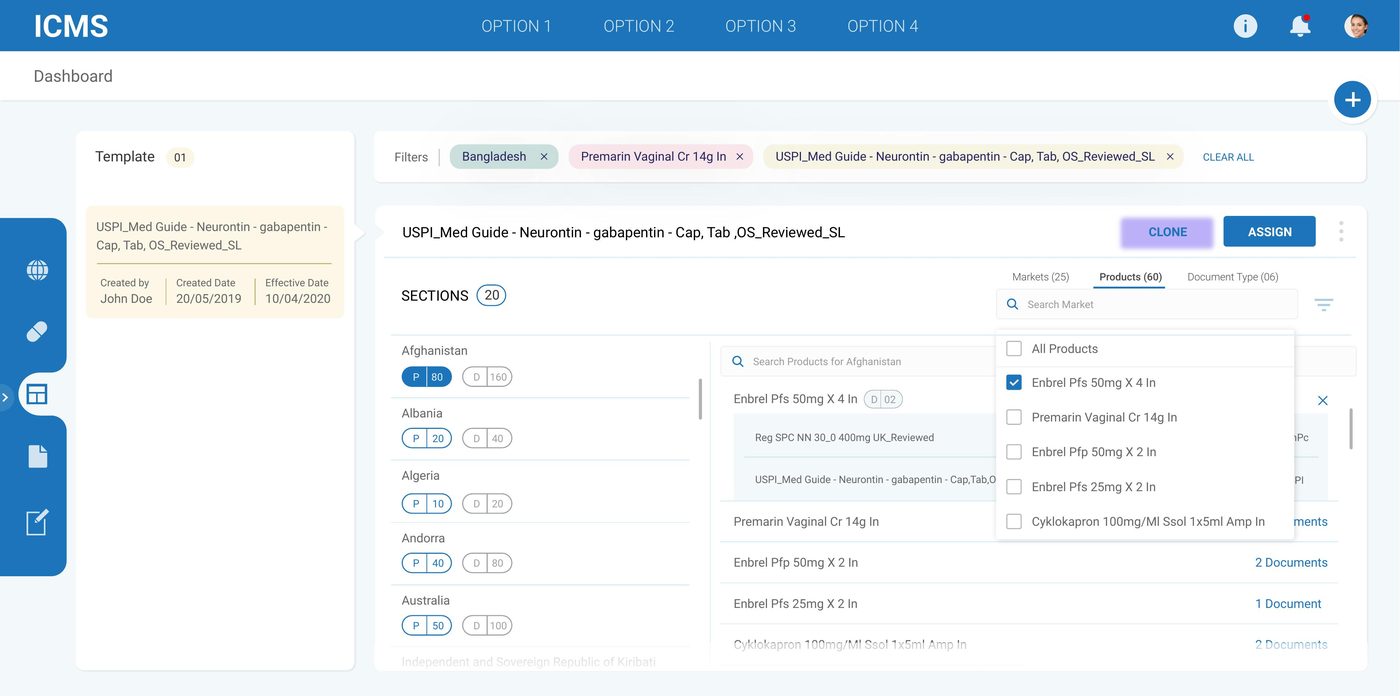
The template system, in production.
Actual shipped screens — from the dashboard through template creation, assignment, modification, and migration.



Two decisions that shaped the work.
Impact assessment before every modification
Editing a template already assigned to live documents used to be a leap of faith — nobody could see how many markets, products, or documents a change would touch until after it was made. The redesign surfaces that impact upfront: "This will affect 20 markets, 80 products, 160 documents" before a single edit is confirmed.
An outline, not a file tree
The single biggest usability shift came from rejecting the engineer's mental model. Content leads think in nested document sections, not folders and files — so the builder reads and behaves like an outline, with indentation doing the work a tree UI usually does with icons and drag handles.
One structure, trusted everywhere it's used.
A three-level nested outline builder that content teams could use without engineering support.
Bulk assignment across markets and products, replacing what had been a manual, one-by-one process.
Impact assessment shown before every template modification — no more editing live structure blind.
A migration flow that moves documents between templates without leaving anything orphaned.
What this project reinforced.
The right mental model beats the more "correct" one
A file-tree explorer is arguably more powerful. An outline builder is what content teams actually think in. Matching the user's model won over technical elegance every time.
Show consequences before asking for confirmation
"Are you sure?" means nothing without specifics. Naming exactly what a change will touch — markets, products, documents — turns a scary confirmation into an informed one.
Structural problems need structural thinking, not screens
Time spent modelling the nesting rules on paper before wireframing anything paid for itself many times over once the interface had to actually hold that structure together.